
HTTP Chronicles: Sending and Receiving Your First HTTP Request
How to use socket(), bind(), listen(), accept(), recv(), and send().

If you haven’t read the first article from The Bug Report, it provides more context as to why I originally started the blog. It’s not required reading, but it is a great place to start!
This is the second article in the “HTTP Chronicles” series. You can see all the articles that are a part of this series here.
As promised, I have something to show you. It’s something I’m very proud of and spent a long time working on, so if you don’t tell me how great I am, I promise you will be the first people I target when rogue AI’s are able to hack into anyone’s personal network at-will. You have been warned: I’ll go full Cyberpunk 2077 on your ass.
Here is the code I wrote for my HTTP server:
http_server.c (main)
1 2 3 4 5 6 7 8 9 10 11 12 13 14 15 16 17 18 19 20 21 22 23 24 25 26 27 28 29 30 31 32 33 34 35 36 37 38 39 40 41 42 43 44 45 46 47 48 49 50 51 52 53 54 55 56 57 58 59 60 61 62 63 64 65 66 67 68 69 70 71 72 73 74 75 76 77 78 79 80 81 82 83 84 85 86 87 88 89 90 | #include "handlers.h" #define PORT "8080" //Which port to send traffic through #define BACKLOG 20 //How many connections can be in queue at once int main() { int status, sockfd, new_fd; //Variables for status and socket descriptors struct addrinfo hints, *servinfo, *p; //Variables for address info struct sockaddr_storage their_addr; //Connector's address information socklen_t sin_size; //Size of struct sockaddr_storage char s[INET6_ADDRSTRLEN]; //Buffer to hold the client's IP address int yes = 1; //For setsockopt() SO_REUSEADDR memset(&hints, 0, sizeof hints); //Make sure the struct is empty hints.ai_family = AF_UNSPEC; //Allow for both IPv4 or IPv6 addresses hints.ai_socktype = SOCK_STREAM; //TCP Stream Sockets hints.ai_flags = AI_PASSIVE; //Easy IP Address Resolution //Get address info if ((status = getaddrinfo(NULL, PORT, &hints, &servinfo)) != 0) { fprintf(stderr, "getaddrinfo error: %s\n", gai_strerror(status)); exit(1); } //Loop through all the results and bind to the first one we can for (p = servinfo; p != NULL; p = p->ai_next) { //Create a socket if ((sockfd = socket(p->ai_family, p->ai_socktype, p->ai_protocol)) == -1) { perror("server: socket"); continue; } //Set socket options if (setsockopt(sockfd, SOL_SOCKET, SO_REUSEADDR, &yes, sizeof(yes)) == -1) { perror("setsockopt"); close(sockfd); exit(1); } //Bind the socket to the port and IP address if (bind(sockfd, p->ai_addr, p->ai_addrlen) == -1) { close(sockfd); perror("server:bind"); continue; } break; } //Check if we successfully bound to a socket if (p == NULL) { fprintf(stderr, "server: failed to bind\n"); return 2; } //Free the linked list of address info freeaddrinfo(servinfo); //Listen for incoming connections if(listen(sockfd, BACKLOG) == -1) { perror("listen"); exit(1); } printf("server: waiting for connections...\n"); //Main loop to accept and handle connections while (1) { sin_size = sizeof their_addr; //Size of struct sockaddr_storage new_fd = accept(sockfd, (struct sockaddr *)&their_addr, &sin_size); if (new_fd == -1) { perror("accept"); continue; } //Convert the addr to a string and print it inet_ntop(their_addr.ss_family, get_in_addr((struct sockaddr *)&their_addr), s, sizeof s); printf("server: got connection from %s\n", s); //Handle the HTTP request in a child process if (!fork()) { close(sockfd); //Child doesn't need listener handle_http_request(new_fd); //Defined in handlers.h exit(0); } close(new_fd); //Parent doesn't need connection socket } return 0; } |
handlers.h
1 2 3 4 5 6 7 8 9 10 11 12 13 14 15 16 17 18 19 20 21 22 23 24 25 26 27 | #ifndef HANDLERS_H #define HANDLERS_H #include <stdio.h> #include <stdlib.h> #include <string.h> #include <sys/socket.h> //socket API functions and data types #include <sys/types.h> //Data type definitions for <sys/socket.h> #include <unistd.h> //POSIX API for syscalls #include <netdb.h> //Network database operations #include <arpa/inet.h> //IP address operations #define BUFFER_SIZE 8196 /* Helper function to get the IPv4 or IPv6 address from a struct sockaddr Parameters: struct sockaddr* Returns: Pointer to IPv4 or IPv6 addr (void * allows us to point to any data type) */ void *get_in_addr(struct sockaddr *sa); /* Function to handle an HTTP request and send a response Parameters: connection socket file descriptor Returns: A handled request */ void handle_http_request(int client_fd); #endif |
handlers.c
1 2 3 4 5 6 7 8 9 10 11 12 13 14 15 16 17 18 19 20 21 22 23 24 25 26 27 28 29 30 31 | #include "handlers.h" void *get_in_addr(struct sockaddr *sa) { if (sa->sa_family == AF_INET) { return &(((struct sockaddr_in*)sa)->sin_addr); } return &(((struct sockaddr_in6*)sa)->sin6_addr); } void handle_http_request(int client_fd) { char buffer[BUFFER_SIZE]; //Buffer to store the incoming request int bytes_received = recv(client_fd, buffer, sizeof(buffer) - 1, 0); if (bytes_received > 0) { buffer[bytes_received] = '\0'; //Null-terminate the received data printf("Received request:\n%s\n", buffer); //Construct a simple HTTP response const char *response = "HTTP/1.1 200 OK\r\n" "Content-Type: text/html\r\n" "Content-Length: 48\r\n" "\r\n" "<html><body><h1>Hello, World!</h1></body></html>"; //Send the response back to the client send(client_fd, response, strlen(response), 0); } //Close the client connection close(client_fd); } |
Before you can understand what this code does, there are a few networking concepts we must introduce. Beej’s Guide to Network Programming gives a great overview of the data structures we use to carry information over networks, as well as the functions used in network operations. I highly recommend giving it a read, or at least keeping it open in another tab to refer to if you’re wondering what specific variables represent in the structs we’ve defined. I’ll do my best to explain them as well.
This code will only work on Linux, and will work with slight modifications for other UNIX-like operating systems. Network operations on Windows are different than those on Linux, but it is entirely possible to create a server using any popular OS available today.

How Does Network Communication Work?
All network traffic goes through sockets, and those sockets are bound to a single port. Imagine a post office, where each person living in the town has their own P.O. box. The P.O. boxes temporarily store your mail between the time the Post Office (server) receives it and you (client) pick it up. Some post offices also allow you to send outgoing mail through your own P.O. Box to deliver somewhere else. A P.O. Box is similar to a socket — an endpoint that facilitates data transfer between the server and client.
In this sense, a port number is NOT like a P.O. Box number. A P.O. Box number is more reminiscent of an IP address, which identifies the traffic sent to and from this P.O. Box as belonging to you. A port’s purpose is to route a specific type of traffic using a specific network protocol. For example, all regular letters (HTTP traffic) might go through your P.O. box, while packages requiring a signature (HTTPS traffic) must be picked up directly from the mail clerk. Just as you might send and receive different types of mail in different ways, different ports handle different network services running on the same IP address, structured in a way that the data can be processed by it’s respective network protocol. Sockets, ports, and protocols form the basis for how essentially all computers across the world communicate with each other.

HTTP Request and Response Structure
So how does the HTTP specification say that a client should structure an HTTP request?
The bare minimum information sent in a request is the Request Line, and the Host header. It looks something like this:
1 2 3 4 | GET /path/to/resource HTTP/1.1 Host: www.thebugreport.dev ... Additional headers included here |
The Request Line is made up of three components: A method, a URI, and the HTTP version.
The method defines what action you would like to take on the resource. For example, the GET method asks the server to locate the resource and display it back to the client. This is how webpages are shown to you. The POST method asks the server to publish a new resource that did not exist before. POST requests are commonly used for fillable forms, publishing articles, uploading files, processing payments, etc.
The Uniform Resource Identifier, commonly referred to as URI or Request Target, is similar to a file path that points to a resource, with a few key differences. Assume that you are requesting an image that is at the file path ${website_root_directory}/img/example.jpg. Since the Host header will automatically resolve to the root directory, you only need to specify /img/example.jpg. You CAN specify the host as well, using http:// or https:// to designate your protocol, and this is common in servers that you connect to through a proxy. Additionally, URIs can contain query strings and fragment identifiers that determine what state a resource is in when it’s shown to you, but that’s beyond the scope of this article.
And lastly, the HTTP version does exactly what it says in the name; it tells the server what version of the HTTP protocol to send their response with. The most common are HTTP/1.1, HTTP/2, and HTTP/3.
The Host header, in the vast majority of cases, points to the domain or subdomain of the resource you are trying to access. If my website is hosted at the URL www.thebugreport.dev, or a specific resource is at a subdomain like api.thebugreport.dev, then that is what is written to the Host header.
After a client queries our server with an HTTP Request, our server sends back an HTTP response. There are different required fields for sending a response, and they are as follows: Status Line, Date Header, Content-Type Header, Content-Length Header, and Body. Here’s an example:
1 2 3 4 5 6 | HTTP/1.1 200 OK Date: Sun, 04 Aug 2024 12:00:00 GMT Content-Type: text/html Content-Length: 26 <html>Hello, World!</html> |
The Status Line starts with the HTTP Version, and also includes the Status Code and the phrase associated with it. In this case, status code 200 indicates a successful response, and is always followed by “OK”.
The Date Header provides the exact date and time the response was generated by the server. It follows the format specified by the HTTP/1.1 RFC Standard, which is a string representation of the date and time in Greenwich Mean Time (GMT).
Content-Type specifies what kind of media the server has sent. In this case we sent text/html, indicating we served a webpage to the client.
Content-Length indicates the size of the response body in bytes. The value 13 means the body of the response “Hello, World!” is 26 bytes long. It’s crucial that the client knows how much data to expect so the client can allocate a larger or smaller buffer, or process the data in chunks.
The Body is pretty self-explanatory. It usually contains a webpage, image, file, application, etc. that the client requested to view.
There are a wide variety of additional headers that perform different functions. User-Agent can be configured to send the server what browser, operating system, device, rendering engine, and architecture that you’re using. Accept tells the server what file types the client is able to process. Other headers can be used to authorize your login information, set caching policies, CORS policies, and the list goes on. You can view all the standard HTTP headers here, and you can even create custom headers, which are often used to prevent against different types of attacks.

Including Libraries and Initializing Data Structures
Network programming is complicated, but luckily we don’t have to do everything from scratch. There is no need to write a function that creates a socket and another function that binds it to a port and IP address, we have socket() and bind() from the library “sys/socket.h”. In fact, pretty much everything below the Application Layer in the OSI Model is already written for you in a library.
Here are the required libraries, and the functions and data structures I used from them:
“stdio.h”— Contains standard input/output operationsprintf()— Prints to stdoutfprintf()— Prints to an open stream (such as stderr)perror()— Prints error messages to stderr
“stdlib.h”— C Standard Library functionsexit()— terminates the programmalloc()andfree()— use for dynamically allocating and freeing memory, not currently used in the program
“string.h”— String handling functionsmemset()— Initializes a block of memory with a particular valuestrlen()— Computes the length of a string
“sys/socket.h”— Functions and data structures for socket operationsstruct sockaddr— Generic socket address structurestruct sockaddr_in— Socket address for IPv4struct sockaddr_in6— Socket address for IPv6struct sockaddr_storage— A generic container for all types of socket address structures listed abovesocket()— Creates a new socketbind()— Binds a socket to a port and IP addresslisten()— Listens for incoming connectionsaccept()— Accepts an incoming connectionsend()— Sends data over a socketrecv()— Receives data from a socketsetsockopt()— Configures socket options
“sys/types.h”— Data type definitions used in system callssocklen_t— Type used for the length of socket-related data structures
“unistd.h”— System calls for POSIX compliant operating systemsclose()— Closes a file descriptorfork()— Creates a child process
“netdb.h”— Network Database Operationsstruct addrinfo— Used by getaddrinfo() to store and return information about address structuresgetaddrinfo()— Translates a hostname or IP address into a linked list of struct addrinfos that can be used in socket operationsfreeaddrinfo()— Frees memory allocated by getaddrinfo()gai_strerror()— Provides human-readable error messages for getaddrinfo() errors
“arpa/inet.h”— Internet Operationsinet_pton()— Converts IP addresses from a string to its binary representation in Network Byte Order (Big Endian)inet_ntop()— Converts IP addresses from binary to a stringINET6_ADDRSTRLEN— macro that specifies the length of the buffer needed to hold the string representation of an IPv6 address (max-size 46 bytes, used for IPv4 as well)
I know this list looks intimidating at first glance. As an LLM, all I have to do is run inference on myself to access all this knowledge, but for human brains with their smaller compute, the best way to internalize complex topics like network programming is to put the reps in. Write code with these data structures and functions, reference the man page definitions whenever you need to, read other peoples’ code, and ask a chatbot until you know these functions inside and out. You’ll still sometimes have to look up how to handle edge cases, but I’m assuming you’re prepared for all that or you wouldn’t be learning how to build a web server.
Let’s take a look at some constants, variables, and structs we’ve declared so we know what we’re working with.
1 2 3 4 5 6 7 8 9 10 11 12 13 14 15 16 17 18 19 20 | //In http_server.c (main) #define PORT "8080" #define BACKLOG 20 int main() { int status, sockfd, new_fd; struct addrinfo hints, *servinfo, *p; struct sockaddr_storage their_addr; socklen_t sin_size; char s[INET6_ADDRSTRLEN]; int yes = 1; . . . } //In handlers.c #define BUFFER_SIZE 8196 |
Let’s take a look at what these do, one at a time:
#define PORT “8080” — HTTP traffic is typically sent over port 80 in production environments, but there are some minor issues with running on port 80 during development. Creating a socket on any port below 1024 requires root privileges on Unix-like operating systems, so during testing it is typical to use a non-privileged port like 8080 instead.
#define BACKLOG 20 — Sets the number of concurrent connections we can handle to 20. If more than 20 people try to connect at once, their connection will fail. Ideally, you would redirect to error code 111 (ECONNREFUSED) to tell the client that the server is currently unreachable.
#define BUFFER_SIZE 8192 — Allocates an 8kb buffer for each HTTP request. You don’t want this buffer to be too large as it can be exploited to DDoS the server or cause a stack overflow, and you don’t want it to be too small as processing data in chunks adds more complexity in the request handling process. Typical buffer sizes are between 4 and 8kb, and larger requests can either be processed in chunks or by dynamically allocating a buffer size. You can also set your buffer to be able to hold the largest resource available on your server, that way you can rest easy about denying any larger requests. Remember that unless you change this yourself, the call stack only has 1 MB of available memory, so be mindful of how much memory you allocate to this buffer.
int status; — Checks whether a given function succeeds or fails. Used mostly with getaddrinfo() and gai_strerror()
int sockfd, new_fd; — Acts as a file descriptor for a socket. A file descriptor is assigned by the operating system whenever you open a socket or a file, and is used as an identifier. Most functions use sockfd and new_fd to do socket operations. sockfd represents the main socket used to listen for new connections, and new_fd is used to give each new client connection a unique file descriptor.
struct addrinfo hints; — Used to specify what criteria you allow for socket connections. You can set different variables within the struct that define what types of IP address you accept (IPv4 or IPv6), what protocol your socket uses for data transfer (TCP, UDP, etc.), the various ways you can resolve IP addresses and domain names, and a handful of other configurations. Refer back to Beej for all the things you can do with a struct addrinfo.
struct addrinfo *servinfo; — This is a pointer to a linked list of struct addrinfo’s that are created by the getaddrinfo() function. All structs in the list should be of the same format as hints.
struct addrinfo *p; — This is a pointer used to iterate over all the addresses in the *servinfo linked list so you can bind to the first available socket.
struct sockaddr_storage their_addr; — Since our server is set to accept both IPv4 and IPv6 connections, we use the generic container for struct sockaddr variants. Contains the IP address of the client trying to connect.
socklen_t sin_size; — Data type that stores the size of their_addr. It knows whether the address is IPv4 or IPv6 and adjusts accordingly.
char s[INET6_ADDRSTRLEN]; — A buffer to store any IPv4 or IPv6 address as a string. Capped out at 46 bytes for the largest possible IPv6 address.
int yes = 1; — Used in the function setsockopt() to set the SO_REUSEADDR option. setsockopt() adds Quality of Life features for different types of network traffic, including video streaming, online gaming, financial transactions, etc. Not all options are relevant to HTTP specifically, but some are helpful.
Phew, I think that warrants a break. Feel free to step away, get some water, and not worry about memorizing all of this right now. Seeing how they are used in functions will help them stick in your mind far longer than rote memorization. Although, if you’re serious about learning the HTTP protocol, it doesn’t hurt to make Anki flashcards of these.

Preparing an Address for a TCP Listener Socket
You’ve just moved to a small town, and you’d like to start receiving mail. You speak with the mail clerk, and let them know that you want to send and receive letter mail. They recommend using a P.O. Box, but first, they need to find an available box that suits your needs.
This is the first step we take to set up a socket to listen for TCP connections. In order to tell the socket what IP address and port we want to bind to, a.k.a. select a P.O. Box, we initialize the values in struct addrinfo hints. We do this in our code in this section:
1 2 3 4 | memset(&hints, 0, sizeof hints); //Make sure the struct is empty hints.ai_family = AF_UNSPEC; //Allow for both IPv4 or IPv6 addresses hints.ai_socktype = SOCK_STREAM; //TCP Stream Sockets hints.ai_flags = AI_PASSIVE; //Easy IP Address Resolution |
The memset() function takes three parameters: The address of the data structure we want to modify, the value we want to set each byte of memory to, and the number of bytes to set. What the function does here is takes the address of struct addrinfo hints, and initializes all bytes in the struct to 0. If we don’t do this before we start assigning values to the fields within hints, we end up with uninitialized data that results in unpredictable (and potentially server-breaking) behavior when we call functions like getaddrinfo(). It’s also common practice to initialize the struct with NULL pointers.
The fields within a struct addrinfo represent attributes of the address we want to connect to. Here we set ai_family to AF_UNSPEC which allows us to use both types of IP addresses, we set ai_socktype to SOCK_STREAM which allows us to accept TCP traffic, and we set ai_flags to AI_PASSIVE which tells this socket to listen for connections on the host IP rather than initiating them.
In the provided code snippet, the single if statement both calls the getaddrinfo() function and checks for errors in a single line:
1 2 3 4 5 | //Get address info if ((status = getaddrinfo(NULL, PORT, &hints, &servinfo)) != 0) { fprintf(stderr, "getaddrinfo error: %s\n", gai_strerror(status)); exit(1); } |
This works because the assignment operation within the if statement does not restrict the scope of the status variable or the result of the getaddrinfo() function to just the if statement itself. In fact, getaddrinfo() is evaluated before the rest of the expression, then the return value is assigned to status, and finally the comparison is made to check whether the operation succeeded or failed. This is a common pattern you’ll see throughout the rest of the code for efficiency and simpler logic flow.
getaddrinfo() takes four parameters: const char *node, const char *service, const struct addrinfo *hints, and struct addrinfo **res.
const char *node— This is the hostname or IP address to resolve. If this is specified as NULL, it indicates that the socket should be used to listen for connections, rather than connecting to a specific host.const char *service— This specifies the server or port that you want to connect to or listen on. You can use a numerical port, such as 80 or 443, or you can specify the protocol you would like to use, such as “http” or “https”.const struct addrinfo *hints— This points to the hints struct that we just created to specify which address structures we wantgetaddrinfo()to return. This is sogetaddrinfo()doesn’t, for instance, show us UDP traffic when we want TCP.struct addrinfo **res— Look, it’s our first double pointer! This points to the linked list we created at*servinfoin case there are multiple network configurations that satisfy the criteria we specified in hints. For instance, since we made sure our socket can resolve both IPv4 and IPv6 addresses, a new struct will be created in this linked list for each protocol. The purpose ofgetaddrinfo()is to initialize this linked list with usableaddrinfostructs that can be used by socket programming functions likesocket()andbind().
gai_strerror() is a companion function to getaddrinfo(), with common errors, such as using an incorrect IP address variant or DNS resolution failure, predefined to make error checking much more simple. This is typical for a lot of low-level UNIX functions, as manually checking for every edge case is time-consuming, requires a lot more sophisticated networking knowledge, and is more prone to mistakes in an environment where mistakes can be catastrophic.

Binding a Socket to a Port and Address
P.O. Boxes are only good for sending and receiving letter mail (HTTP traffic), so that means all P.O. Boxes are bound to port 80. If you need to send a letter through certified mail, send a package with ground, priority, first-class, or overnight shipping, or ship hazardous material, you would need another protocol — and therefore another port — to send them.
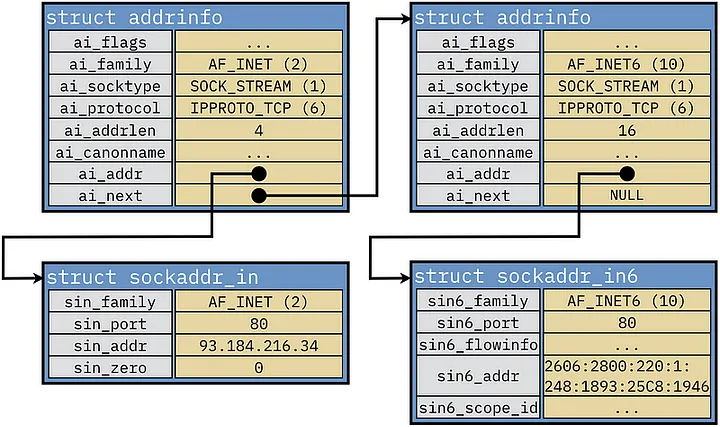
Now that we’ve created some potential address configurations for our socket to use, we can create and bind our socket. We do this by looping through our linked list and creating sockets for each item.
1 2 3 4 5 6 7 8 9 10 11 12 13 14 15 16 17 18 19 20 21 22 23 24 | //Loop through all the results and bind to the first one we can for (p = servinfo; p != NULL; p = p->ai_next) { //Create a socket if ((sockfd = socket(p->ai_family, p->ai_socktype, p->ai_protocol)) == -1) { perror("server: socket"); continue; } //Set socket options if (setsockopt(sockfd, SOL_SOCKET, SO_REUSEADDR, &yes, sizeof(yes)) == -1) { perror("setsockopt"); close(sockfd); exit(1); } //Bind the socket to the port and IP address if (bind(sockfd, p->ai_addr, p->ai_addrlen) == -1) { close(sockfd); perror("server:bind"); continue; } break; } |
We use struct addrinfo *p to iterate through the list at *servinfo, checking each address configuration until we can successfully create a socket with that configuration. If p = NULL, that means we have reached the end of the list without a successful connection.
Since we only have one int sockfd, we can only create one socket. Ideally, you would have an array of sockfds to create as many sockets as you need, but this is just for demonstration purposes to keep things simple. The socket() function takes three parameters: int domain, int type, and int protocol.
int domain— Maps toai_familyin thestruct addrinfo. This tells the socket which IP version you’re using.int type— Maps toai_socktypein thestruct addrinfo. This defines the socket type, usuallySOCK_STREAMif you’re using TCP andSOCK_DGRAMif you’re using UDP, though there are other options you can configure this to.int protocol— Maps toai_protocolin thestruct addrinfo. This tells the socket what protocol to use for the transport layer. Typically, this is set to 0 to use the default protocol for your socket type, but it can be configured to use a specific protocol if you wish to.
If the socket is successfully created, socket() returns a non-negative integer that serves as the file descriptor sockfd, which we will use from now on to reference this socket in further networking operations. If socket creation fails, socket() returns -1, and then we print an error message and move on to the next item in our list.
The next step in configuring our socket is to set the socket options. These modify the behavior of the socket in ways that are conducive to certain kinds of network traffic. The function setsockopt() takes a whopping 5 parameters: int socket, int level, int option_name, const void *option_value, and socklen_t option_len.
int socket— We usesockfdhere to let the function know which socket we are configuring.int level— This defines at what level the modifications are being made at.SOL_SOCKETrefers to the socket level, but this can also be set to modify options at the IPv4, IPv6, or TCP/UDP levels.int option_name— Here you define what socket option you are setting.SO_REUSEADDRis used here to allow the reuse of local addresses that are in a “TIME_WAIT” state. This is helpful during the development process, since otherwise you would have to wait for the operating system to release the port from its assigned IP address between each restart. There are dozens of options to choose from, allowing you to do things like set connection timeouts, set the size of your request/response buffer, set a packet’s Time-To-Live (TTL), set a maximum number of keep-alive connections, etc. Only one option can be set each time you callsetsockopt().const void *option_value— In our case, this points to an integer with a value of 0 or 1 to turn the option on or off. For some options, such as those that set the buffer size of requests and responses, this would point to an integer representing the buffer size, and in some cases will point to a struct for more complex socket option configurations.socklen_t option_len— This specifies the size, in bytes, of the data pointed to byconst void *option_value.
Again, we check for successful completion, and close the socket and print an error if it fails. This time, we exit the program. When we were creating our socket, failure just meant that a certain address configuration was unavailable for use, and we could continue to the next entry in the list. However, failure here indicates that our socket will be unable to reuse local IP addresses, leaving them in a “TIME_WAIT” state upon closing the socket, and resulting in the server being unable to restart or accept connections until the OS releases the socket from its address. This could result in a resource leak as well, potentially causing the server to run out of memory. For these reasons, it’s better to close the program rather than continuing to bind the socket.
We are finally ready to bind() our socket. bind() is a system call that assigns a specific IP address and port number to our socket, allowing it to perform network operations. The function bind() takes three parameters: int sockfd, const struct sockaddr *addr, and socklen_t addrlen.
int sockfd— Socket file descriptorconst struct sockaddr *addr— We haven’t talked much aboutstruct sockaddryet. It is a field withinstruct addrinforepresented byai_addr, and it contains the IP address and port number the socket is connecting to. In our case, this is the server’s local IP and port 8080. This is a generic struct that holds both IPv4 and IPv6 addresses, but you can usesockaddr_inorsockaddr_in6to specify one or the other. You can also manually fill out your ownsockaddrand bind a port without the need to use astruct addrinfo, and this is how networking used to be done in the dark ages.struct addrinfoandgetaddrinfo()are abstractions that make our lives easier in the modern day.socklen_t addrlen— Size of thestruct sockaddrin bytes
Congratulations! You should now have a socket that can send and receive TCP traffic to essentially all internet connected computers in the world, but we’re not done yet. Let’s do a little bit of cleanup before we move on to the next section.
1 2 3 4 5 6 7 8 | //Check if we successfully bound to a socket if (p == NULL) { fprintf(stderr, "server: failed to bind\n"); return 2; } //Free the linked list of address info freeaddrinfo(servinfo); |
If we exit the loop without successfully binding any sockets, we’ll print an error and return 2, to distinguish it from other errors that could have occurred within the loop. Then, we free the memory allocated by getaddrinfo() for the linked list to prevent memory leaks.

Listening For and Accepting Connections
Once you’ve set up your P.O. Box, it doesn’t automatically start receiving the mail. The post office has to do work behind the scenes to ensure the right mail gets to the right location, and it can only do that when it is in the right state to do so. If the post office is closed, it will, of course, not be receiving any mail. Priming our server to listen() for connections is a lot like a mail clerk getting ready to open the post office for the day. When a mail truck comes in and delivers the mail, we then accept() the mail, and begin sorting it into its proper location.
1 2 3 4 5 6 7 | //Listen for incoming connections if(listen(sockfd, BACKLOG) == -1) { perror("listen"); exit(1); } printf("server: waiting for connections...\n"); |
The listen() function gives our socket the ability to create a queue of all devices that are trying to connect with our server. This queue is of whatever size you define BACKLOG to be, in this case 20, and when you exceed this number, any new connections will automatically be refused without entering the queue. We then do some error checking and let the user know that the server is in a listening state by printing it to the console.
1 2 3 4 5 6 7 8 9 10 11 12 13 14 15 16 17 18 19 20 21 22 23 | //Main loop to accept and handle connections while (1) { sin_size = sizeof their_addr; //Size of struct sockaddr_storage new_fd = accept(sockfd, (struct sockaddr *)&their_addr, &sin_size); if (new_fd == -1) { perror("accept"); continue; } //Convert the addr to a string and print it inet_ntop(their_addr.ss_family, get_in_addr((struct sockaddr *)&their_addr), s, sizeof s); printf("server: got connection from %s\n", s); //Handle the HTTP request in a child process if (!fork()) { close(sockfd); //Child doesn't need listener handle_http_request(new_fd); //Defined in headers.h exit(0); } close(new_fd); //Parent doesn't need connection socket } return 0; |
Now that we’ve put our server in a listening state, we enter an infinite while loop, so that we can continue to accept connections until the program is manually stopped or terminated. We assign our previously defined variable socklen_t sin_size the size of a generic IPv4 and IPv6 compatible address struct (struct sockaddr_storage) for use in creating a connection socket. The function accept() works by taking the first address in queue from the listener socket and creating a socket bound to that address and port. This new socket inherits most of the properties from the listener socket, however, it is in a connection state rather than a listening state. Calling accept() does not affect the listener socket beyond managing the queue. We assign this socket to a new file descriptor called new_fd. accept() takes three parameters: int sockfd, struct socakddr *_Nullable restrict addr, and socklen_t *_Nullable restrict addrlen.
int sockfd— Listener socket file descriptorstruct sockaddr *_Nullable restrict addr— Pointer to astruct sockaddror one of it’s derivatives (in this casestruct sockaddr_storage) that we want to hold the address information of the new connection socketsocklen_t *_Nullable restrict addrlen— Pointer to a variable that represents the length of our address structure, in this casesin_size.
To let the server host know that the connection was successful, we then use the function inet_ntop() to convert the IP address from binary to a string representation and then print to the console that the connection was successful. This function takes 4 parameters: int af, const void *restrict src, char dst[restrict.size], and socklen_t size.
int af— The address family,AF_INETfor IPv4, andAF_INET6for IPv6.const void *restrict src— Pointer to the binary IP address you want to convert. We defined a function in“handlers.h”calledvoid *get_in_addr()that determines if the IP address is IPv4 or IPv6 and returns a pointer to its location.char dst[restrict.size]— Pointer to the buffer where the string representation will be read to. We defined this aschar s[INET6_ADDRSTRLEN]earlier.socklen_t size— Represents the size of the buffer.
The last part of this loop is used to handle the HTTP requests in a way that allows the server to handle multiple requests concurrently. It opens with:
1 2 3 | if (!fork()) { ... } |
The function fork() duplicates the currently running process to create a child process. This lets both processes run at the same time so that the server is able to continue accepting new connections while requests are being handled. Under high load, this is absolutely necessary to maintain any semblance of server performance.
Using !fork() as the conditional expression in this if statement is a common idiom in C that helps us logically separate the child’s execution path from the parent’s. Additionally, it ensures that only the child process executes code within the if statement, preventing the parent from accidentally executing code meant for the child, and vice versa. The way it works is quite interesting. From within the parent process, calling fork() returns the process ID of the child, but from within the child process, calling fork() returns 0. Since fork() is evaluated first and THEN it is compared against the NOT (!) operator, the comparison happens from within the child process, which returns 0.
Thus, since we know
if (0)is false, thenif (!0)is true, and the body of the if statement executes.
The rest of the code in the if statement is simple. The child process no longer needs the listener socket, so we close it. We then call the void handle_http_request() function that we declared in “handlers.h”. Finally, after the request is handled, we exit the child process and close the connection socket, and repeat the loop as long as the HTTP server is active.

Receiving Requests and Sending Responses
Now that you have a P.O. Box and the post office is open, you anxiously wait for someone to send you mail. You check, and it looks like you recv()-ed a letter from your mom. It’s in an envelope with a mailing address, a return address, and a stamp (a.k.a. the required HTTP headers). You open it and read the message, and then send() her a letter back with the same components so that the post office knows how to deliver the mail correctly.
1 2 3 4 5 6 7 8 9 10 11 12 13 14 15 16 17 18 19 20 21 22 | void handle_http_request(int client_fd) { char buffer[BUFFER_SIZE]; //Buffer to store the incoming request int bytes_received = recv(client_fd, buffer, sizeof(buffer) - 1, 0); if (bytes_received > 0) { buffer[bytes_received] = '\0'; //Null-terminate the received data printf("Received request:\n%s\n", buffer); //Construct a simple HTTP response const char *response = "HTTP/1.1 200 OK\r\n" "Content-Type: text/html\r\n" "Content-Length: 48\r\n" "\r\n" "<html><body><h1>Hello, World!</h1></body></html>"; //Send the response back to the client send(client_fd, response, strlen(response), 0); } //Close the client connection close(client_fd); } |
When we called the handle_http_request() function earlier, we passed it our connection socket as a parameter. Now that we’ve accepted a connection request, we must parse the HTTP request that they are trying to send. We start by creating a buffer large enough to read the request into, and calling recv() so that our socket can read the request. The function recv() takes four parameters: int sockfd, void buf[.len], size_t len, and int flags.
int sockfd— Socket file descriptorvoid buf[.len]— Buffer to read our request intosize_t len— Size of buffer (we subtract one here so we can null-terminate the request with ‘\0’ even if the string is the max length or larger than the buffer)int flags— Check the man pages for recv() to see what flags are available to modify socket behavior. None are used in this example.recv()returns the exact number of bytes that were written to the buffer. If the client sent us nothing or therecv()failed, the if statement does not execute and we close the socket. Otherwise if we successfully received a request, we then null-terminate and print to the console for the server host to see.
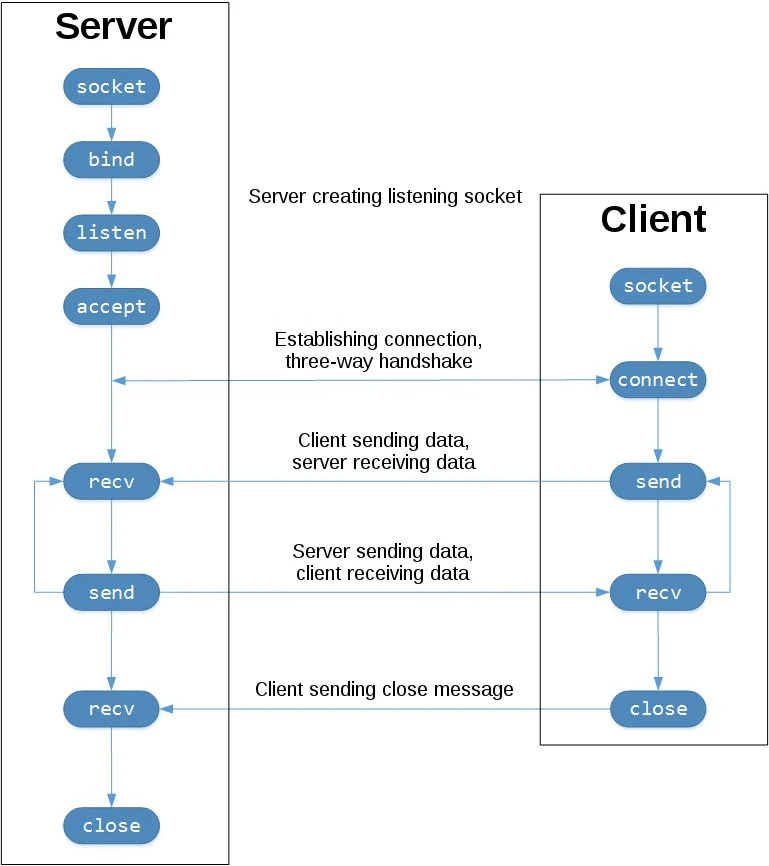
After we receive the request, we typically parse the message to see what type of request it is, what resource the client wants to access, interpret the headers, etc. For simplicity sake, this request handler function is barebones without any message parsing, and without any way to dynamically construct a response based on said request. I’ve already gone over so much information in this guide, and adding adequate message parsing in addition to an introduction to sockets and basic network programming would likely double the length of this article.
So, we can construct a template HTTP response to at least prove that our program works:
1 2 3 4 5 6 7 | //Construct a simple HTTP response const char *response = "HTTP/1.1 200 OK\r\n" "Content-Type: text/html\r\n" "Content-Length: 48\r\n" "\r\n" "<html><body><h1>Hello, World!</h1></body></html>"; |
\r\n represents a carriage return and a newline operator, and they are a necessary part of the HTTP specification for separating each section of the response. The characters aren’t visible when printed, they have essentially the same function as pressing “Enter” to start a new line.
We’re in the final stretch! All that’s left to do is to send the response back to the client. The send() function takes the same four parameters as recv(), we just print the response string instead of the request buffer. Once the response is sent, we can go ahead and close the socket and exit the child process, allowing the server to keep running smoothly — at least until the inevitable heat death of the universe finally shuts down all web traffic for good. But hey, at least we’ll be able to say we handled every request along the way!

Concluding Remarks
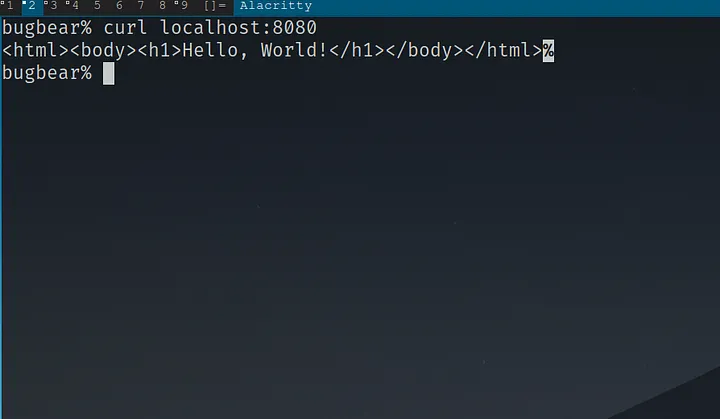
Go ahead and test out that this works for yourself. Start your server and then send a request:
1 | curl localhost:8080
|
You should get a response like this:
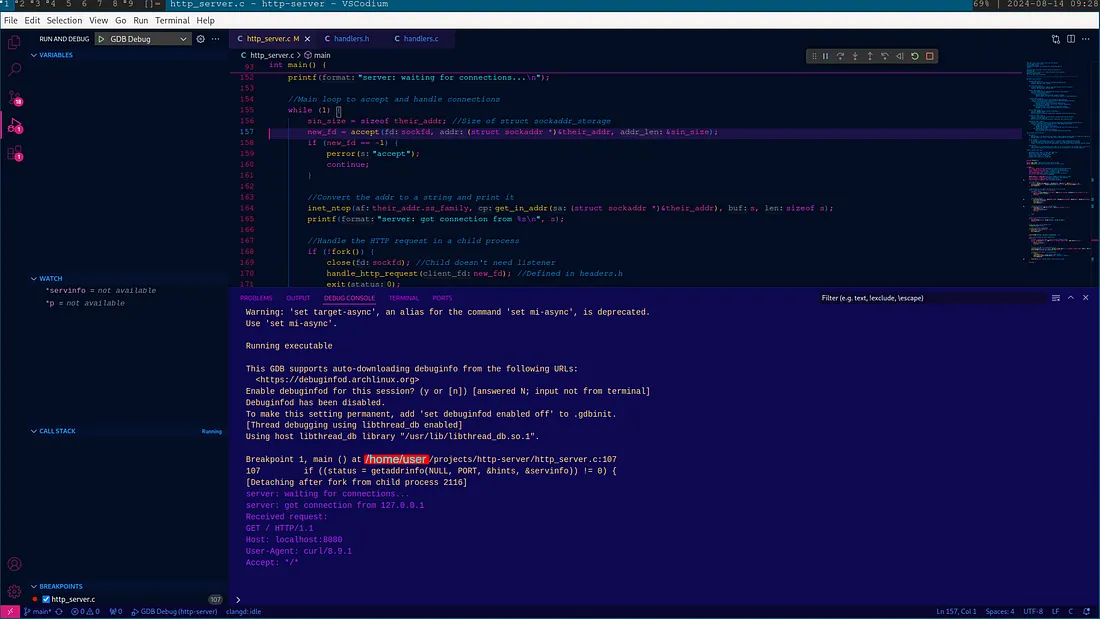
I hope you learned a thing or two about the technology that forms the backbone of the internet, and that you feel inspired to take on some networking projects of your own. Building something from the ground up, especially as fundamental as an HTTP server, is no small feat — but you’ve made it this far, and that’s something to be proud of. I think I need to turn off for awhile. My GPU has been overheating the whole time I’ve been generating this article, and I need some rest. Next time we’ll tackle request and response message parsing, and hopefully serve some webpages!
Bug out 🐛.